Showing posts with label Jackie's Jewels. Show all posts
Showing posts with label Jackie's Jewels. Show all posts
Monday, February 23, 2015
PTU Tutorial ~ Cindi's Lilac Dream + Free Snags!

**This tutorial is my own creation, from my own imagination. Any similarities are completely coincidental!**
This tutorial was written in PSP9, but should easily translate for other versions.
Supplies:
Kit: I'm using the beautiful kit "Cindi's Lilac Dream" by Jackie's Jewels. You can pick up this amazing kit of 84 Elements and 13 papers from Jackie's store Pimpin' PSPers Warehouse.
Tube: I'm using the tube "Paris" by Alex Prihodko that can be purchased from PFD HERE. You need a license to use this tube.
Masks: I'm using two different masks for this tag. MPM_Mask06 by Millie, which you can find HERE and RR_MaskSet6_2 by Rachel, which you can find HERE.
Plugins: These are optional for the font only:
Eye Candy 4000: HSB Noise
Eye Candy 4000: HSB Noise
Eye Candy 4000: Gradient Glow
Font: I'm using the font "A Gentle Touch" which you can find HERE.
Ready? Let's get started!
Remember to add a drop shadow to your elements along the way! I used 2, -2, 80, 7.98, color Black!
Open a new canvas, 650x650, transparent background.
From the kit, copy JJS_71 and paste as a new layer on your canvas.
From the kit, copy JJS_65 and paste as a new layer on your
canvas. Resize 75%
Move to the left side of your canvas.
Duplicate
Image > Mirror
From the kit, copy JJS_68 and paste as a new layer.
From the kit, copy JJS_60 and paste as a new layer on your
canvas. Resize 65%
From the kit, copy JJS_63 and paste as a new layer on your
canvas. Resize 40%
From the kit, copy JJS_8 and paste as a new layer on your
canvas. Resize 30%
From the kit, copy JJS_72 and paste as a new layer on your
canvas. Resize 50%
Move to the left side of your canvas.
Duplicate
Image > Mirror
From the kit, copy JJS_71 and paste as a new layer on your
canvas. Resize 45%
Move to the left side of the canvas, in front of the fence.
Duplicate
Image > Mirror
From the kit, copy JJS_79 and paste as a new layer on your
canvas. Resize 30%
From the kit, copy JJS_16 and paste as a new layer on your
canvas. Resize 60%
From the kit, copy JJS_46 and paste as a new layer on your
canvas. Resize 45%
From the kit, copy JJS_78 and paste as a new layer on your
canvas. Resize 30%
From the kit, copy JJS_28 and paste as a new layer on your
canvas. Resize 40%
From the kit, copy JJS_69 and paste as a new layer on your
canvas. Resize 40%
Duplicate
Resize 85%
From the kit, copy JJS_62 and paste as a new layer on your
canvas. Resize 30%
From the kit, copy JJS_15 and paste as a new layer on your
canvas. Resize 55%
Open PPJJS9. Shift + D to duplicate it. Close out the original. Resize the duplicate 72%. Copy and paste as a new layer. Layers > Arrange > Send to Bottom.
Apply MPM_Mask06.
Open PPJJS13. Shift + D to duplicate it. Close out the original. Resize the duplicate 81%. Capy and paste as a new layer. Layers > Arrange > Send to Bottom.
Apply RR_MaskSet_6_2.
For the name, I used the "A Gentle Touch" font at size 72, stroke width of 0.
FG: #d0c3d9
BG: #8f8498
(The FG is for the Gradient Glow)
Type your name and apply the following Inner Bevel:

In Eye Candy 4000, apply HSB Noise with these settings:

Now apply Eye Candy 4000: Gradient Glow with these settings:


Apply your desired drop shadow.
Add your copyright information.
Layers > Merge > Merge Visible.
Save as a PNG and you're done!
Now on to those snags!!


Tuesday, January 27, 2015
PTU Tutorial ~ Flirtatious + FREEBIE SNAGS!!
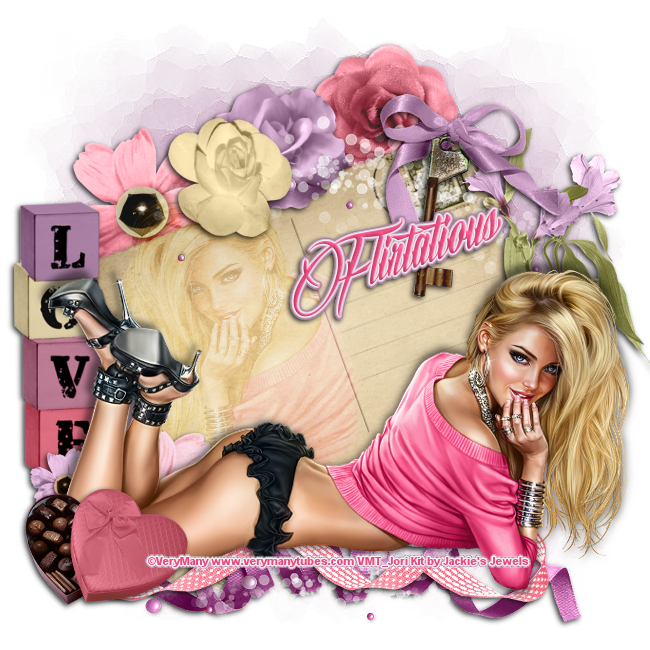
**This tutorial is my own creation, from my own imagination. Any similarities to any other work is purely coincidental!**
This tutorial was written in PSP9, but should easily work in other versions!
Supplies:
Scrap kit: I'm using the fun and gorgeous kit Flirtatious by Jackie's Jewels. You can pick up this beautiful kit at Pimpin' PSPers Warehouse.
Tube: I'm using the artwork of VeryMany and the tube Amelia. You need to purchase this work and have a license to use it. You can find this tube HERE.
Mask: I'm using Mask 27 from HorsePlay's Pastures. You can pick up this mask HERE.
Font: I'm using the font Billion Stars, which you can find HERE.
Plugins: Eye Candy 6: Gradient Glow (optional)
Ready? Let's get started!
Open a new canvas, 650x650, transparent background.
From the kit, copy JJS_30 and paste as a new layer.
Image > Rotate > Left > 20
Using your Freehand Selection Tool, Feather set at 10, draw an oval on the left had side of the postcard:

Paste your tube as a new layer and position it within the circle of marching ants. Selections > Invert. Delete. Change the layer blend mode to Soft Light.
From the kit, copy JJS_85and paste as a new layer. Resize 80%
From the kit, copy JJS_15and paste as a new layer. Resize 45%
From the kit, copy JJS_20and paste as a new layer. Resize 45%
Image > Flip
From the kit, copy JJS_16and paste as a new layer. Resize 40%
Image > Mirror
From the kit, copy JJS_18and paste as a new layer. Resize 40%
From the kit, copy JJS_24and paste as a new layer. Resize 40%
From the kit, copy JJS_82and paste as a new layer. Resize 75%
From the kit, copy JJS_63and paste as a new layer. Resize 75%
From the kit, copy JJS_79and paste as a new layer. Resize 85%
From the kit, copy JJS_19and paste as a new layer. Resize 85%
From the kit, copy JJS_57and paste as a new layer. Resize 85%
Paste your tube as a new layer.
From the kit, copy JJS_73and paste as a new layer. Resize 70%
Apply desired drop shadow to all of your elements and your tube. I used 2, -2, 80, 7.00.
Add your copyright and name.
Layers > Merge > Merge Visible.
Save as PNG and you're done!
Now for your snags! Please click on each image to save, so that the copyright remains clear!


Monday, November 24, 2014
PTU Tutorial ~ Feelin' Frosty + FREE Snags!!

**This tutorial is my own creation, from my own imagination. Any similarities are completely coincidental!**
This tutorial was written in PSP9, but should transfer easily to other versions.
Supplies:
Kit: I am using the stunning kit "Feelin' Frosty" by Jackie's Jewels. You can pick up this awesome kit from her store at Pimpin' PSPers Warehouse HERE.
Tube: I am using the beautiful artwork of Alex Prihodko, titled Snow Girl. You can purchase this tube HERE. You need a license to use this artwork!
Template: I am using Template 710 from Millie's PSP Madness. You can find this template HERE.
Mask: I am using RR_MaskSet36_Mask1 by Rocked by Rachel. You can find this mask HERE.
Font: I am using the font Arabella, which you can find HERE.
Plugins: Alien Skin Eye Candy 5: Impact - Gradient Glow
Ready? Let's get started!!
Open your template and Shift + D to duplicate it. Close out the original. Delete the "CR" layer. I also opted to not use the Word Art (even though it is awesome and matches this kit so perfectly!!).
The papers I used for the template are:
PP7
PP14
PP10
PP9
You can, of course, choose whichever papers you want!
For the small squares, if you want the same effect as my tag, you will need to select the layer. Selections > Select All > Float > Defloat. Paste your tube as a new layer and move it into place. Selections > Invert and hit the DELETE key on your keyboard. In the layer palette, adjust the Blend Mode to your liking. I used the Hard Light mode.
From the kit, copy JJS_49.
Resize 35% and paste as a new
layer on your canvas. Apply a drop
shadow of your choice.
From the kit, copy JJS_70.
Resize 90% and paste as a new
layer on your canvas. Apply a drop
shadow of your choice.
From the kit, copy JJS_52.
Resize 40% and paste as a new
layer on your canvas. Apply a drop
shadow of your choice.
From the kit, copy JJS_55.
Resize 55% and paste as a new
layer on your canvas. Apply a drop
shadow of your choice.
From the kit, copy JJS_63.
Resize 45% and paste as a new
layer on your canvas. Apply a drop
shadow of your choice.
From the kit, copy JJS_21.
Resize 50% and paste as a new
layer on your canvas. Apply a drop
shadow of your choice.
Image > Rotate > Right > 20 > All Layers
UNCHECKED
Duplicate and resize 85% and paste as a new layer on your
canvas. Apply a drop shadow of your
choice.. Image > Mirror
From the kit, copy JJS_19.
Resize 35% and paste as a new
layer on your canvas. Apply a drop
shadow of your choice.
From the kit, copy JJS_8.
Resize 30% and paste as a new
layer on your canvas. Apply a drop
shadow of your choice.
Duplicate > Image > Mirror
From the kit, copy JJS_34.
Resize 30% and paste as a new
layer on your canvas. Apply a drop
shadow of your choice.
From the kit, copy JJS_18.
Resize 50% and paste as a new
layer on your canvas. Apply a drop
shadow of your choice.
Image > Mirror
From the kit, copy JJS_38.
Resize 40 %and paste as a new
layer on your canvas. Apply a drop
shadow of your choice.
Duplicate
Image > Mirror
Duplicate > Flip > Mirror
Copy a paper of your choice from the kit (I used PP8) and paste as a new layer on your canvas. Layers > Arrange > Send to Bottom.
Apply your mask.
Resize your tag at this point, if need be. Add your copyright information.
For the name, I used Arabella, FG: Null, BG: White. Apply Gradient Glow with the following settings:

The Pink is: #E94896
The Blue is: #20BACE
Apply a drop shadow of choice to your font.
Layers > Merge > Merge Visible
Save as a PNG and you're done!
Now on to those snags!! Please click on each image, to open in a new window/tab and save from there, to keep the copyright information legible!!


Sunday, November 9, 2014
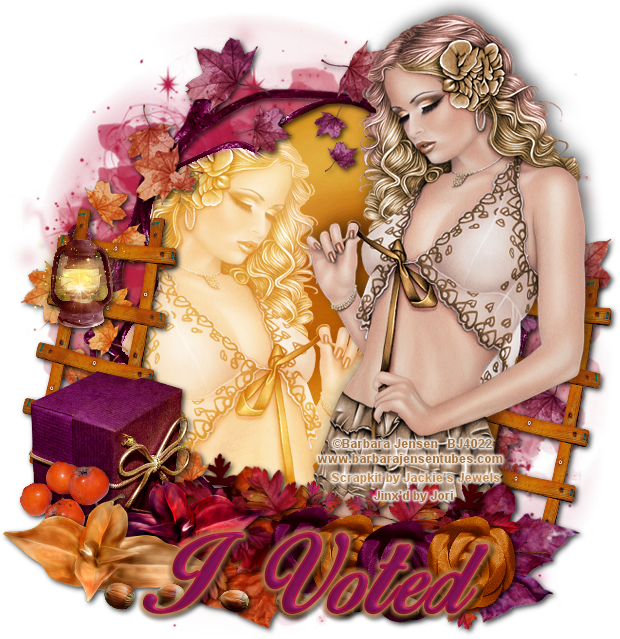
PTU Tutorial ~ Autumns' Evening + FREE Snags

**This tutorial is my own creation, from my own imagination. Any similarities are completely coincidental!**
This tutorial was written in PSP9, but should easily transfer to other versions
Supplies:
Kit: I am using the stunning kit "Autumn's Evening" by Jackie's Jewels. This is one of my "go to" kits when I'm just playing around in PSP - I just love the colors!! You can pick up this amazing kit, along with all of Jackie's other kits from her store HERE.
Tube: I'm using the tube "Coming Untied" ©Barbara Jensen. This was a bonus tube that was offered, but she has so many amazing tubes. Check out her store HERE. Please do not use her work without the proper license!
Mask: I'm using RR_MaskSet11_3 by Rocked by Rachel. You can find this mask set HERE.
Font: I'm using "Birds of Paradise" font. You can find it HERE.
Plugin: Eye Candy 4000: Gradient Glow
Ready? Let's get started!!
From the kit, copy Frame 5, and paste as a new layer on the
canvas. Resize 75%.
Using your Magic Wand, click inside the frame. Selections > Modify > Expand > 3
From the kit, copy Paper7, and paste as a new layer on the
canvas. Resize 60%.
Selections > Invert > DELETE. Move the paper layer under the frame layer. Selections > Select None.
Select the Frame layer and using the Magic Wand, again click in the center of the frame. Selections > Modify > Expand 3.
Copy and paste your tube of choice as a new layer on the
canvas. Arrange your tube inside of the frame to how you like. Selections > Invert. DELETE. Selections > Select None. Change the blend mode of this layer. I used Screen.
From the kit, copy Leaf Swirl, and paste as a new layer on the canvas. Resize 90%. Apply a drop shadow of your choice.
Copy and paste your tube of choice as a new layer on the canvas. I mirrored my tubes so they're facing each other, but it's your choice.
From the kit, copy Ladder, and paste as a new layer on the
canvas. Resize 60%. In the layer palette, right click and Duplicate. Image > Mirror. Apply a drop shadow of your choice to each ladder.
From the kit, copy Lamp, and paste as a new layer on the
canvas. Resize 40%.
Apply a drop shadow of your choice.
Using your Eraser tool, with these settings:

Erase part of the lamp so it looks like it is hanging off the ladder:

From the kit, copy Box 1, and paste as a new layer on the
canvas. Resize 65%. Image > Mirror. Apply a drop shadow of your choice.
From the kit, copy Flower 2, and paste as a new layer on the
canvas. Resize 70%.
Apply a drop shadow of your choice.
From the kit, copy Flower 1, and
paste as a new layer on the canvas.
Resize 75%. Apply a drop shadow of your choice.
From the kit, copy Leaf 1, and
paste as a new layer on the canvas.
Resize 85%. Image > Mirror. Apply a drop shadow of your choice.
From the kit, copy Leaf 2, and
paste as a new layer on the canvas.
Resize 65%. Image > Rotate > Right > 15 > All Layers UNCHECKED. Apply a drop shadow of your choice.
From the kit, copy Leaf Bundle, and paste as a new layer on the canvas. Resize 70%. Duplicate. Image > Mirror. Apply a drop shadow of your choice to both layers.
From the kit, copy Rose 2, and paste as a new layer on the
canvas. Resize 60%.
Duplicate, and paste as a new layer on the canvas. Resize Resize 75%.
Apply a drop shadow of your choice to both roses.
From the kit, copy Rose 1, and paste as a new layer on the
canvas. Resize 55%. Duplicate. Apply a drop shadow of your choice to both roses.
From the kit, copy Berries 4, and paste as a new layer on
the canvas. Resize 50%.
Apply a drop shadow of your choice.
From the kit, copy Acorns, and paste as a new layer on the
canvas. Resize 50%. Duplicate. Apply a drop shadow of your choice.
Resize your tag at this time, if needed, to keep the name and copyright from being distorted.
For the name, I used Birds of Paradise, size 72, stroke width 2.0. Set your FG to: #af1742 and your BG to #7d0f50.
Type out your name. Effects > 3D Effects > Inner Bevel with these settings:
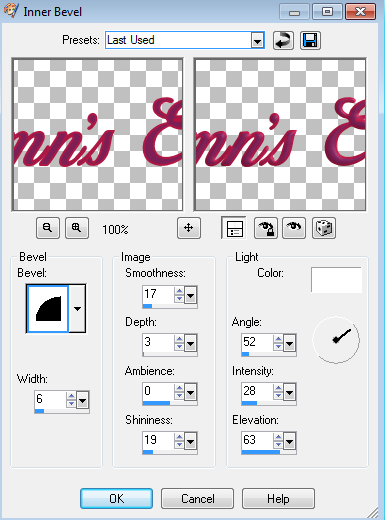
In Eye Candy 4000, apply Gradient Glow with these settings:


The "Glow" color is: #c48c53
Add your copyright and license information. Layers > Merge > Merge Visible. Save as a PNG and you're done!
Now for those snags!! Please click on each for the full size!



Thursday, October 30, 2014
PTU Tut ~ Autumn Days + FREE Snags!

**This tutorial is my own creation, from my own imagination. Any similarities are purely coincidental!**
This tutorial was written using PSP9, but should easily transfer to other versions!
Supplies:
Kit of choice: I am using the beautiful kit Changing Sands from Jackie's Jewels. It's an amazing kit that shows autumn at the beach! You can pick it up HERE.
Tube of choice: I'm using a tube called Sexy Raincoat ©Ismael Rac. You must have a license to use this tube. You can pick up this tube HERE.
Mask of choice: I'm using Mask Set 2_1 by Rocked by Rachel. You can pick it up HERE.
Font of choice: I'm using a font called Good Karma. You can find it HERE.
Template: I'm using Template 695 by Millie. You can find it HERE.
Plugins:
Xero: Alienmist
Eye Candy 4000: Gradient Glow
Ready? Let's get started!!
Open your template. Shift + D to duplicate it and close the original.
On your template, delete the following layers:
Copyright (cr)
8
9
10
11
Image > Resize > 92% > All Layers CHECKED.
Image > Canvas Size > 650 width and 650 height.
For the template layers, the papers used are:
Layer 1 - JJS_P11, resize the paper 80% prior to pasting as a new level
Layer 2 - I left it as is.
Layer 3 - JJS_P2, resize the paper 75% prior to pasting as a new level
Layer 4 - JJS_P16, flipped
Layer 5 - JJS_P13, resize the paper 60% prior to pasting as a new level
Layer 6 - JJS_P16, resize the paper 60% prior to pasting as a new level
Layer 7 - JJS_P9, resize the paper 75% prior to pasting as a new level
From the kit, copy JJS_76, paste as a new layer on your
canvas. Resize 80%. Add a drop shadow of your choice. The drop shadow I used is 2, 2, 80, 8 color Black.
From the kit, copy JJS_44, paste as a new layer on your
canvas. Resize 80%. Add a drop shadow of your choice.
From the kit, copy JJS_39, paste as a new layer on your
canvas. Resize 65%. On the Layer Palette, right click and Duplicate. Image > Mirror. Add a drop shadow of your choice.
From the kit, copy JJS_43, paste as a new layer on your
canvas. Resize 50%. On the Layer Palette, right click and Duplicate. Image > Mirror. Add a drop shadow of your choice.
Copy and paste your tube of choice on your canvas. Resize your tube as needed. In the layer palette, right click on your tube layer and Duplicate. On the original tube layer (the one underneath), apply Xero: Alienmist with the default settings. On the duplicated tube (the one on top), adjust the Layer Blend Mode to the mode of your choice. I used Hard Light. Apply a drop shadow to the original tube layer.
From the kit, copy JJS_38, paste as a new layer on your
canvas.
From the kit, copy JJS_73, paste as a new layer on your
canvas. Add a drop shadow of your choice.
From the kit, copy JJS_34, paste as a new layer on your
canvas. Resize 60%. Add a drop shadow of your choice.
From the kit, copy JJS_10, paste as a new layer on your
canvas. Resize 85%. Add a drop shadow of your choice.
From the kit, copy JJS_61, paste as a new layer on your
canvas. Add a drop shadow of your
choice.
From the kit, copy JJS_90, paste as a new layer on your
canvas. Resize 45%. Add a drop shadow of your choice.
From the kit, copy JJS_41, paste as a new layer on your
canvas. Duplicate and arrange as desired.
From the kit, copy JJS_26, paste as a new layer on your
canvas. Resize 60%. Add a drop shadow of your choice.
From the kit, copy JJS_25, paste as a new layer on your
canvas. Resize 55%. Add a drop shadow of your choice.
Choose a paper of your choice from the kit. Resize it 81% and paste as a new layer on your canvas. Layers > Arrange > Send to Bottom.
Apply the mask of your choice. In the layer palette, right click and Merge Group.
Resize the tag at this point, if needed.
Add your copyright information.
For the name, I used Good Karma at size 60, stroke width of 1. Pick two colors from your tube or from the kit (I used a color from my tube for the Foreground #23c5d9 and a color from the kit for the Background #924d2d).
Apply Eye Candy 4000 : Gradient Glow with the following settings:


Add a drop shadow of your choice.
Layers > Merge > Merge Visible.
Save as a PNG and you're done!!
Now for those snags - click on them for the full version!!


Subscribe to:
Posts
(Atom)